
Features
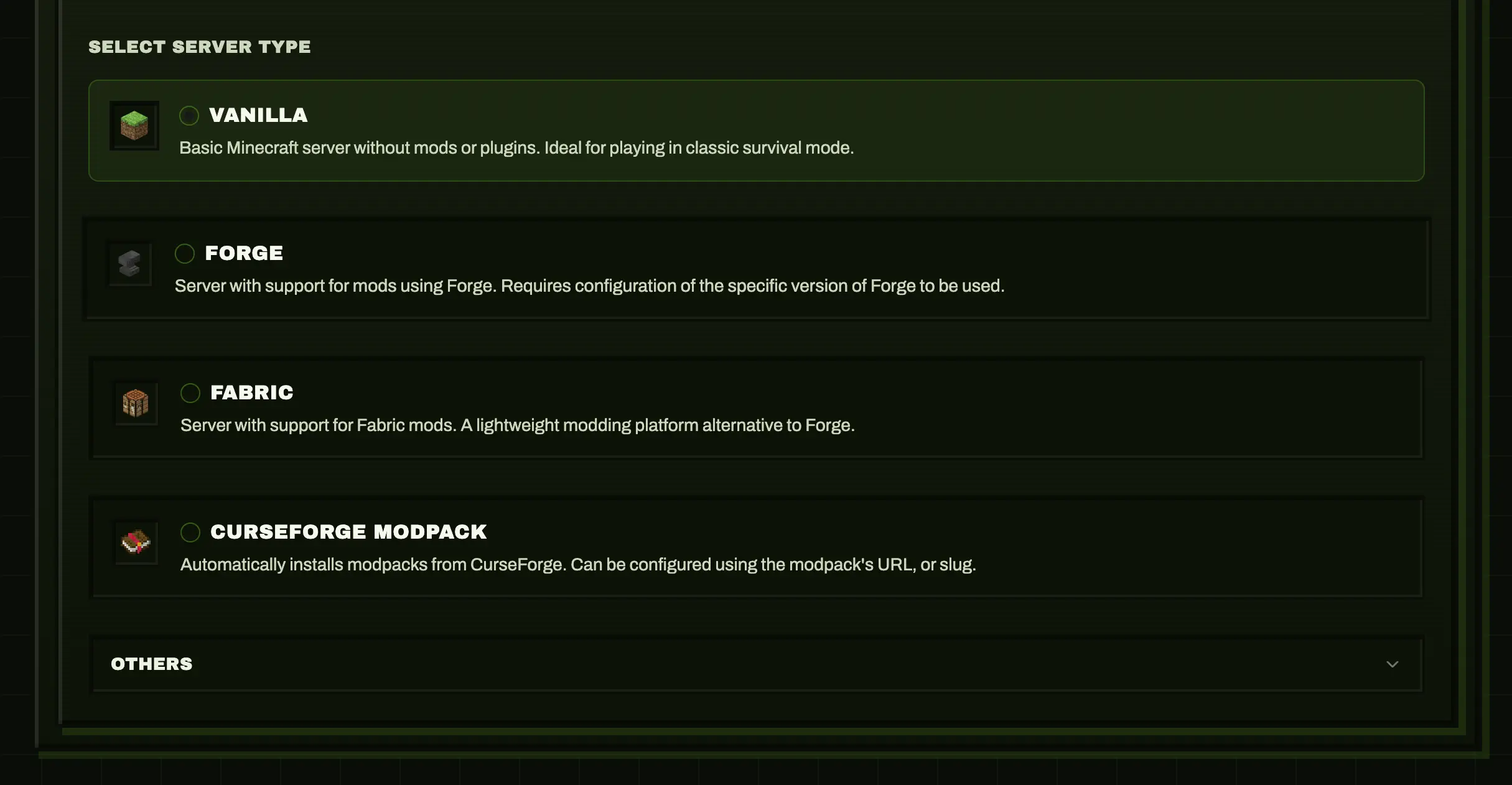
Server Management
| Feature | Description |
|---|---|
| Java & Bedrock | Both Minecraft editions supported |
| Multiple servers | Run as many as hardware allows, isolated containers |
| All server types | Vanilla, Paper, Forge, Neoforge, Fabric, Purpur, GTNH, CurseForge, Modrinth and Feed The Beast (FTB) modpacks |
| Any version | 1.8 to latest, snapshots included |
| Templates | Pre-configured: Survival, Creative, SkyBlock, PvP, Bedrock presets, and Paper cross-play |
| Java defaults | Global defaults for new Java servers (offline mode, resources, backup switch) |
| Resource limits | Set RAM, CPU per server |
| Clone server | Duplicate a server's configuration under a new ID (world data and files are not copied) |
Real-time Monitoring
| Feature | Description |
|---|---|
| Dashboard | Status cards, resource usage at a glance |
| Live logs | Streaming, errors highlighted, searchable |
| Log export | Download the last 10,000 log lines as a .log file from the Logs tab |
| Stats | CPU%, RAM%, player count, uptime |
| History | Per-server CPU/RAM graphs (1h–72h) in the Metrics tab, sampled every minute with 7-day retention |
| Alerts | Opt-in Discord alerts per server: unexpected server down, and sustained high CPU/RAM above configurable thresholds (Metrics tab; requires the Discord webhook from Settings > Integrations) |
Server Control
| Feature | Description |
|---|---|
| Basic controls | Start, Stop, Restart, Delete |
| Console | RCON (Java) or send-command (Bedrock) |
| Quick actions | Save world, toggle whitelist, set time/weather, broadcast |
| Scheduled tasks | Auto restarts and scheduled console commands, per server in the Tasks tab. Schedule by fixed interval or standard 5-field cron expression (e.g. 0 4 * * * = daily at 04:00, backend timezone) |
Roles and Access Control
This is the first phase of Minepanel roles.
| Feature | Description |
|---|---|
ADMIN role | Full panel access without permission restrictions |
USER role | Access limited by explicit permissions |
manageUsers permission | Lets delegated operators manage users, invitations, and audit access without full admin rights |
| Server access | All servers or selected server assignments |
| Logs vs console | Separate permissions for viewing logs and sending commands |
| File access | Separate permissions for global files and per-server files |
| Invitations | New users join through invitation links, with optional SMTP delivery |
| Audit log | Filterable activity history for account, invitation, and server actions |
Authorization model
- The frontend can hide or show sections for convenience, but the backend is the real permission boundary.
- Minepanel keeps authentication in
httpOnlycookies and does not rely onlocalStoragefor authorization. - The current user/session can be cached briefly in memory only to reduce repeated calls such as
/auth/meor/users/one. - Every protected backend route still resolves the current user and re-checks the required permission before returning data or executing the action.
Audit coverage
The current audit phase includes:
- login
- invitation creation, copy, and acceptance
- password changes
- email change request and confirmation
- user access updates and deletion
- server configuration saves
- server start, stop, and restart
- console command execution
Player Management
| Feature | Description |
|---|---|
| Online players | View, kick, ban, change gamemode, teleport |
| Whitelist | Add/remove players |
| Operators | Manage OPs from panel |
| Ban list | View reasons, unban |
Mod & Plugin Support
| Feature | Description |
|---|---|
| Modrinth | Auto-download, dependency resolution |
| CurseForge | Mods and modpacks |
| Combined | Use both simultaneously |
| In-panel search | Search and add mod slugs/IDs directly from the Mods tab |
| Cross-play template | One-click Paper preset with Geyser, Floodgate, ViaVersion, and UDP port 19132 |
→ Details: Mods & Plugins
File Management
Built-in browser for each server under servers/<id>/mc-data:
- Upload/download files
- Edit configs (syntax highlighting)
- Create/delete/rename
- Drag & drop support
Common paths:
- Worlds source library for world switching:
servers/<id>/worlds/ - Shared World Library for all servers:
servers/.world/worlds/ - Active level data:
mc-data/<LEVEL>/ - Java mods:
mc-data/mods/ - Java plugins (Paper/Spigot/Purpur/etc):
mc-data/plugins/ - Core config files:
mc-data/server.properties,mc-data/eula.txt
Operational notes:
- Uploading/changing worlds, mods, plugins, and most configs usually requires restart.
- World switching supports folders with
level.datand archives (.zip,.tar,.tar.gz,.tgz). WORLDclone source is mounted read-only by Minepanel to avoid accidental source overwrites.- World Library includes Discover Worlds to search CurseForge worlds and import remote ZIP/TAR URLs directly into
servers/.world/worlds/.
Backups
| Feature | Description |
|---|---|
| Automatic | Schedule daily/weekly |
| Manual | One-click backup |
| Restore | Select and restore |
| Download | Get backup files |
Backup configuration is available in Advanced -> Backup (Java servers):
backupMethod:tar,rsync,restic,rclonebackupInterval,backupInitialDelaybackupPruneDays,backupDestDir,backupExcludesbackupHostDir: host path where backups are physically stored. Empty uses the globalBACKUP_BASE_DIRor the default${BASE_DIR}/servers/<id>/backupsbackupOnStartup
Practical defaults:
backupMethod=tarbackupInterval=24hbackupPruneDays=7backupDestDir=/backups
If you only need local compressed backups, start with tar. Use restic when you want encrypted, deduplicated backups on remote storage.
Cloud backups (S3-compatible)
Selecting backupMethod=restic shows a Restic repository section where you configure a remote destination. Any S3-compatible provider works:
| Provider | Repository example |
|---|---|
| AWS S3 | s3:https://s3.amazonaws.com/my-bucket/minecraft |
| MinIO | s3:https://minio.example.com:9000/minecraft-backups |
| Backblaze B2 | s3:https://s3.us-west-002.backblazeb2.com/my-bucket |
| Wasabi | s3:https://s3.wasabisys.com/my-bucket |
| Local path | /backups/restic (stays on the host backups mount) |
Fields:
- Repository: restic repository URL.
s3:repositories also need the access/secret key fields. - Repository password: encrypts the repository. Store it somewhere safe — without it snapshots cannot be restored.
- Retention policy:
restic forgetflags applied after each backup (default--keep-within 7d, e.g.--keep-daily 7 --keep-weekly 4).
The panel lists existing snapshots in the same section (the backup sidecar must be running).
Credentials on disk
Restic credentials are written to the server's generated docker-compose.yml under ${BASE_DIR}/servers/<id>/ (same model as the RCON password). Use a dedicated bucket and access keys scoped to it.
Manual restore (until one-click restore ships):
# 1. List snapshots
docker exec <serverId>-backup restic snapshots

# 2. Stop the server from the panel, then restore into the data volume
docker exec <serverId>-backup restic restore latest --target /data/data inside the backup container is the server's mc-data directory. Note the default /data mount is read-only (:ro); for a restore, run a one-off container with the same repository env vars and a writable mount instead:
docker run --rm \
  -e RESTIC_REPOSITORY=... -e RESTIC_PASSWORD=... \
  -e AWS_ACCESS_KEY_ID=... -e AWS_SECRET_ACCESS_KEY=... \
  -v ${BASE_DIR}/servers/<serverId>/mc-data:/data \
restic/restic restore latest --target /Configuration
Edit from UI:
- Server name, MOTD
- Max players, difficulty, game mode
- View distance, PVP, command blocks
- Spawn protection radius (Java,
SPAWN_PROTECTION;0disables it) - JVM arguments, extra flags
Server Resources (Java)
In Resources tab:
- Memory/CPU: set
INIT_MEMORY,MAX_MEMORY, and CPU limits per server - JVM Options: use
JVM_OPTS,JVM_XX_OPTS,JVM_DD_OPTS,EXTRA_ARGS - Advanced Runtime: timezone, auto-stop, auto-pause, rolling logs
Recommended approach:
- Set only
INIT_MEMORYandMAX_MEMORYfirst. - Enable Aikar flags if you do not have a custom JVM tuning profile.
- Change
JVM_XX_OPTSonly when you have measured a performance issue.
Other
| Feature | Description |
|---|---|
| Multi-language | EN, ES, NL, DE, FR, PL, RU, PT |
| Multi-arch | x86_64, ARM64 (Pi, Apple Silicon) |
| Discord webhooks | Server event notifications |
| MC Proxy Router | Single port for Java servers via hostname |
| End Portal expedition | Optional desktop-only 3D easter egg in Settings > Danger Zone; find and click the portal to return |
Edition Comparison
| Feature | Java Edition | Bedrock Edition |
|---|---|---|
| Server Types | Vanilla, Paper, Forge, etc. | Vanilla only |
| Default Port | 25565 (TCP) | 19132 (UDP) |
| Commands | RCON console | send-command (via logs) |
| Proxy Support | Yes (mc-router) | No |
| Mods/Plugins | Full support | Addons/Behavior Packs |
| Backups | Full support | Full support |
Bedrock Commands
Bedrock servers use send-command instead of RCON. Command output appears in server logs rather than returning directly.
Coming Soon
- Export logs from the log viewer
- Dedicated
server.propertieseditor with validation - Cron-style scheduling (specific times) for scheduled tasks
- Bedrock console commands
→ Full roadmap: Roadmap